README
Open on GitHub ↗
DevDex
Your GitHub profile, rebuilt as a game-style portfolio.
Type any GitHub username → get a live portfolio page.
No signup. No database. No deploy. It's already there.









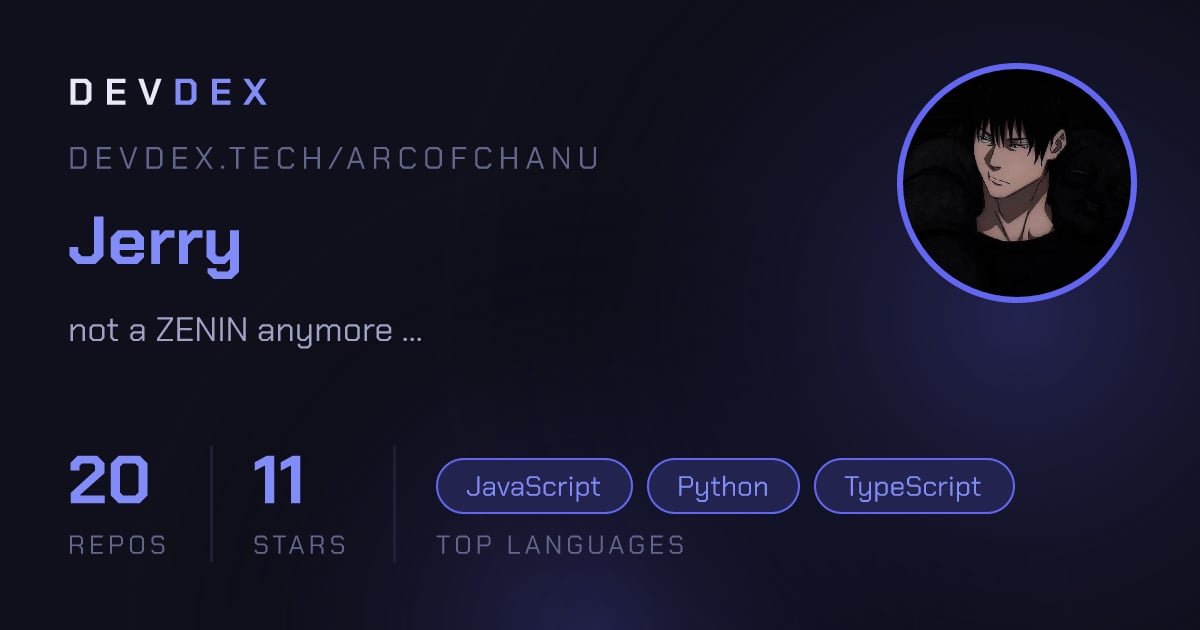
☝️ That image is generated live from GitHub. It's not a screenshot.
🎯 The 30-second version
[!TIP]
You already have a page. Openhttps://devdex.tech/<your-github-username>right now. It works before you sign up, before you configure anything, before you read the rest of this README.
Your GitHub profile is a wall of repo names sorted by "recently pushed." It undersells you.
DevDex reads your live public GitHub data and renders it as a pixel-art storefront: featured projects with screenshots and demo links, an XP bar, a level, a streak, a tier, an animated character, and six switchable themes. Sign in with GitHub and you can curate it — pin projects, hide the junk, rename things, add cover images, group repos into folders.
And here's the fun part:
🗄️ There is no database.
Your customizations are saved as a single .devstore.json file inside a GitHub repo that you own. DevDex has no account table, no user rows, nothing to leak, and nothing to lock you into. Delete the repo and your data is genuinely gone. Everything else is recomputed from the GitHub API on every single page view — so your page can never go stale.
✨ What you get
🎮 Game layerXP, levels, tiers and ship-streaks derived from your real repo activity. Nothing is stored — it's recomputed live. |
🎨 Six themesAnimated backgrounds, sprite characters, custom fonts and full palettes — all driven by JSON. |
✏️ Inline editingSign in with GitHub, toggle edit mode, and curate your page directly on the page itself. |
🖼️ Auto OG imagesEvery profile and repo gets a generated social preview card. Links look good everywhere. |
🏅 Embeddable badgeA live SVG level badge you can drop in any README. Updates itself. |
⚔️ Compare modePut two developers side by side — XP breakdown, radar chart, the works. |
📱 QR sharingOne click turns any project card into a themed, scannable QR poster. |
🌍 Explore feedA directory of claimed builder worlds, newest on top. |
⚡ Edge-renderedRuns on Cloudflare Workers. Service worker + CDN caching on top. |
🧠 How it works
GitHub is the backend. Every box below is either an API call or a static file — there is no persistence layer of our own.
flowchart LR
    V([👤 Visitor]) -->|/username| SK[SvelteKit load<br/>on Cloudflare Edge]

    SK -->|fetchUser| GH[(GitHub REST API)]
    SK -->|fetchRepos| GH
    SK -->|fetchConfig| CFG[(.devstore.json<br/>in user's own repo)]

    GH --> M{{mergeConfigWithRepos}}
    CFG --> M
    M --> PAGE[🎮 Rendered storefront]

    GH --> XP{{xp.js<br/>XP · level · tier · streak}}
    XP --> PAGE

    O([🔑 Owner signs in]) -->|OAuth code| CB[/api/oauth/callback/]
    CB -->|token in URL hash| LS[(localStorage)]
    LS -->|Bearer token, client-side| W[writeConfig → PUT]
    W --> CFG

    style PAGE fill:#33151b,stroke:#dc2626,color:#f5e5e8
    style GH fill:#121218,stroke:#3d1f26,color:#f5e5e8
    style CFG fill:#121218,stroke:#b57aff,color:#f5e5e8
    style M fill:#0a0a0f,stroke:#58a6ff,color:#f5e5e8
    style XP fill:#0a0a0f,stroke:#e3b341,color:#f5e5e8
🔐 Why the auth flow looks like that (click to expand)
The OAuth token is exchanged server-side (the client secret never leaves the Worker), then handed to the browser through the URL hash — which browsers never send to a server. From that moment on, the token lives only in localStorage and talks directly to api.github.com from the client.
That means:
- ✅ We never store, log, or even receive your access token after the redirect.
- ✅ Every write is your browser → GitHub. There's no middleman to compromise.
- ✅ There are no sessions to expire, no session store to run.
- ✅ You are "the owner" of a page purely because your token's login matches the username in the URL.
The trade-off is honest: a localStorage token is readable by any XSS on the origin, which is why the app ships no third-party scripts.
📄 What actually gets saved — the entire "database" (click to expand)
One file. .devstore.json, in the repo <your-username>/devstore, created on your first save.
{
  "theme": "terminal",
  "featured": ["proj-X", "arcade"],        // pinned to the top, animated border
  "hidden":   ["dotfiles", "test-repo"],   // never rendered
  "folders": {
    "Web apps": ["proj-X", "og-vercel"],   // tabs on the /repos page
    "Experiments": ["arcade"]
  },
  "overrides": {
    "proj-X": {
      "title": "DevDex",                                   // display name
      "description": "Game-style GitHub portfolios.",      // replaces repo description
      "demo": "https://devdex.tech",                       // replaces homepage
      "image": "https://i.imgur.com/cover.png"             // card cover art
    }
  }
}
mergeConfigWithRepos() in src/lib/github.js folds this over the live repo list and sorts featured first, then by stars. Anything not mentioned in the file just falls through to GitHub's own values — so the file stays tiny, and deleting it resets you to a clean default rather than an empty page.
🎲 The game layer, explained
Everything here is computed on the fly in src/lib/xp.js. Nothing is stored, so you can't farm it by clicking — only by shipping.
XP formula
| Source | Worth | Why |
|---|---|---|
| 📦 Public repo | × 10 | breadth |
| ⭐ Star received | × 1 | reach |
| 🚀 Repo pushed in the last 7 days | × 50 | momentum — by far the biggest lever |
| 🔤 Distinct language used | × 5 | range |
level = max(1, floor(√(xp / 10)))
Tiers
| Level | Tier | Colour |
|---|---|---|
| 1 – 5 | 🟣 Novice | #9590a8 |
| 6 – 15 | 🔵 Builder | #58a6ff |
| 16 – 30 | 🟪 Architect | #b57aff |
| 31 + | 🟡 Legend | #e3b341 |
Ship streak
| Last push | Status |
|---|---|
| ≤ 3 days | 🔥 On Fire |
| ≤ 7 days | ✅ Active |
| ≤ 14 days | ⚠️ Cooling down |
| > 14 days | 😴 Dormant |
[!NOTE]
Because a fresh push is worth 50 XP and a star is worth 1, an active developer with 3 stars outranks a dormant one with 40. That's deliberate. The page rewards shipping, not archaeology.
🎨 Themes
Each theme is pure data — a theme.json plus a sprite sheet, banner and frame. Add a folder under static/themes/, add its key to AVAILABLE_THEMES in src/lib/theme.js, and it shows up in the switcher. No component changes required.
| Theme | Vibe | |
|---|---|---|
| 🔴 | Default | Onyx black, gaming red and a live circuit-spark grid — pure arcade energy. |
| 🟢 | Terminal | Green-phosphor CRT — scrolling boot log, hex dumps and scanlines. Pure hacker energy. |
| 🟣 | Iris | Midnight black and iris indigo — quiet circuit traces breathing with slow light pulses. |
| 🟡 | Sand Dunes | Rolling parchment dunes, drifting sand and a slow desert wind. |
| 🌸 | Baby Blush | Soft pink skies, falling sakura petals and glowing sparkles. |
| 🍁 | Autumn Grove | A cozy sunset forest — falling maple leaves, golden dust and one great old tree. |
🛠️ Anatomy of a theme.json (click to expand)
{
  "key": "terminal",
  "name": "Terminal",
  "tagline": "Green-phosphor CRT — ...",
  "fonts":  { "url": "https://fonts.googleapis.com/...", "primary": "'DM Mono', monospace" },
  "colors": { "bgBase": "#050705", "accentPrimary": "#3dff7a", /* ...24 tokens */ },
  "featuredBorder": { "type": "conic-rotate", "duration": "3s", "stops": [ /* ... */ ] },
  "character": { "frameSize": 16, "frameCount": 7,
                 "rows": ["idle", "hover", "sleep", "jump", "crown", "spin"] },
  "frame":  { "size": 112, "frameCount": 10 },
  "banner": { "frameWidth": 340, "frameHeight": 120, "frameCount": 8 }
}
theme.js writes every colour token onto document.documentElement as a CSS custom property. Components never receive theme props — they just consume var(--accent-primary) and friends, which is why switching a theme repaints the entire app instantly with zero re-renders.
The character / frame / banner blocks tell the sprite components how to step through their sheets, so a new theme can ship a totally different animation without touching a line of Svelte.
🚀 Run it locally
Prerequisites: Node 18+ and a GitHub account.
git clone https://github.com/arcofchanu/proj-X.git
cd proj-X/devstore
npm install
cp .env.example .env      # then fill it in — see below
npm run dev -- --open
That's it. http://localhost:5173/<any-github-username> should now render a full portfolio.
⚙️ Environment variables — what each one is for (click to expand)
| Variable | Side | Required? | What it does |
|---|---|---|---|
GITHUB_TOKEN |
🔒 server | recommended | A no-scope classic PAT. Lifts the REST rate limit from 60/hr → 5,000/hr. Only reads public data. Without it you'll hit 403s fast. |
GITHUB_CLIENT_ID |
🔒 server | for sign-in | OAuth app client ID, used in the code exchange. |
GITHUB_CLIENT_SECRET |
🔒 server | for sign-in | OAuth app secret. Used only inside /api/oauth/callback. |
VITE_GITHUB_CLIENT_ID |
🌐 public | for sign-in | Same client ID again, but browser-side to build the authorize URL. Client IDs are not secrets. |
[!CAUTION]
Never name your PATVITE_GITHUB_TOKEN. Vite inlines everyVITE_-prefixed variable as a string literal into the browser bundle — that would ship your token to every visitor on the internet. TheVITE_prefix is a publication decision, not a naming convention.
To create the OAuth app: GitHub → Settings → Developer settings → OAuth Apps → New, with the callback URL set to http://localhost:5173/api/oauth/callback for local dev.
Browsing works fully without any OAuth setup — you just can't sign in and edit.
📜 All npm scripts (click to expand)
| Command | What it does |
|---|---|
npm run dev |
Vite dev server, with Cloudflare bindings emulated locally by miniflare |
npm run dev -- --open |
…and opens a browser tab |
npm run build |
Production build via @sveltejs/adapter-cloudflare |
npm run preview |
Serve the production build locally |
npm run prepare |
svelte-kit sync — regenerates types; runs automatically after install |
There is intentionally no test suite, linter, or type-checker configured in this project.
🗺️ Route map
| Route | What it renders |
|---|---|
/ |
Landing page — type a username, get a portfolio |
/<username> |
🎮 The storefront — featured cards, character, XP bar, edit mode |
/<username>/about |
Profile detail, radar chart, XP breakdown |
/<username>/repos |
Full repo list with folder tabs |
/<username>/repos/<repo> |
Single repo view with rendered README |
/compare/<a>/<b> |
⚔️ Head-to-head stat comparison |
/explore |
🌍 Directory of claimed builder worlds |
/badge/<username> |
🏅 Live SVG level badge (image response) |
/og/<username>.png |
🖼️ Social preview card (proxied + edge-cached) |
/og/<username>/<repo>.png |
Per-repo social preview card |
/api/oauth/callback |
OAuth code → token exchange |
/api/explore |
Writes your entry into the explore index (KV) |
/api/preview/<username> |
Live preview data |
/sitemap.xml, /llms.txt, /robots.txt |
SEO + AI-crawler surface |
📁 Project structure (click to expand)
devstore/
├── src/
│   ├── lib/
│   │   ├── github.js        ← 🔑 the ONLY file that talks to the GitHub API
│   │   ├── xp.js            ← XP / level / tier / streak math
│   │   ├── radar.js         ← radar chart geometry + language colours
│   │   ├── theme.js         ← theme registry, loader, CSS-var applier
│   │   ├── theme-store.js   ← Svelte stores wrapping the above
│   │   ├── store.js         ← auth token + authUser stores
│   │   ├── backgrounds.js   ← per-theme animated canvas backgrounds
│   │   ├── config-cache.js  ← optimistic local config so saves feel instant
│   │   ├── img.js           ← image URL normalising / proxying
│   │   └── youtube.js       ← demo-link YouTube embed parsing
│   ├── components/
│   │   ├── CharacterSprite.svelte   ← the animated pixel character
│   │   ├── Background.svelte        ← themed canvas backdrop
│   │   ├── QROverlay.svelte         ← shareable QR poster
│   │   ├── ThemeSwitcher.svelte     ├── TopBar.svelte
│   │   ├── FollowListOverlay.svelte ├── SignInDialog.svelte
│   │   ├── PixelLogo.svelte         └── Seo.svelte
│   ├── routes/              ← see the route map above
│   └── service-worker.js
├── static/themes/<key>/     ← theme.json + character.png + frame.png + banner.png
├── devstore-colors.md       ← canonical palette reference
└── wrangler.jsonc           ← local KV emulation for the explore index
☁️ Deploying
DevDex runs on Cloudflare Pages / Workers via @sveltejs/adapter-cloudflare.
flowchart TB
    subgraph CF["☁️ Cloudflare (main app)"]
        PAGES[SvelteKit on Workers]
        KV[(KV: EXPLORE_INDEX)]
        CACHE[(Edge cache)]
        PAGES <--> KV
        PAGES <--> CACHE
    end

    subgraph VC["▲ Vercel (companion)"]
        OG[satori + resvg<br/>OG image renderer]
    end

    PAGES -->|proxies /og/*| OG
    PAGES -->|reads| GH[( GitHub REST API )]

    style PAGES fill:#33151b,stroke:#dc2626,color:#f5e5e8
    style OG fill:#121218,stroke:#58a6ff,color:#f5e5e8
    style GH fill:#0a0a0f,stroke:#b57aff,color:#f5e5e8
Setup checklist:
- Point Cloudflare Pages at the repo, build command
npm run build, root directorydevstore. - Add
GITHUB_TOKEN,GITHUB_CLIENT_ID,GITHUB_CLIENT_SECRET,VITE_GITHUB_CLIENT_IDin the dashboard. - Create a KV namespace and bind it as
EXPLORE_INDEX(the explore feed 503s without it). - Update your OAuth app's callback URL to the production domain.
[!IMPORTANT]
wrangler.jsoncis local-dev only — it exists so miniflare can emulate KV duringnpm run dev. It has nopages_build_output_dir, so Cloudflare ignores it in production and reads bindings from the dashboard instead. Adding a production binding to that file will not do what you expect.
❓ Why is the OG renderer on Vercel and not Cloudflare? (click to expand)
Rendering a PNG with satori + resvg costs far more than the 10 ms CPU per request allowed on the Cloudflare free plan. So image generation lives in the companion og-vercel/ project, and the Cloudflare route proxies it — deliberately proxies rather than redirects, because WhatsApp's link-preview crawler won't reliably follow a redirect for og:image.
Proxying is pure I/O, so it fits the CPU budget comfortably. The finished image is then stored in the edge cache keyed by the upstream URL (which includes the theme), so a theme change mints a new URL and busts every scraper's preview cache for free.
🏅 Embed your badge
Drop your live level badge into any README — it re-renders from GitHub on every load, so it's never out of date.
[](https://devdex.tech/YOUR_USERNAME)
Or link your full portfolio with a rich social preview:
[](https://devdex.tech/YOUR_USERNAME)
🙋 FAQ
Do I need to sign up?
No. Your page exists the moment your GitHub account does. Sign-in only unlocks editing your own page.
What permissions does DevDex ask for?
Enough to create and write one repo — because that's literally where your config file lives. The token stays in your browser and is used to call GitHub directly; it is never stored on any server of ours.
How do I delete my data?
Delete the
devstore repo from your GitHub account. That's the whole dataset. Your page falls back to the default view generated from public data — the same view every unclaimed user gets.
Can I hide a repo from my page?
Yes — edit mode, hide, save. It's written to
hidden[] in .devstore.json. Note this only hides it on DevDex; a public repo is still public on GitHub.
Why is my page slow / showing an error?
Almost always the GitHub rate limit. Unauthenticated requests are capped at 60/hr — set
GITHUB_TOKEN and it jumps to 5,000/hr.
My XP dropped. Why?
Recent-push XP is worth 50 per repo and only counts the last 7 days. Stop shipping for a week and it evaporates. That's the point — the number reflects now, not lifetime totals.
Can I self-host it for my own org?
Yes. Clone, set the four env vars, point it at Cloudflare. Nothing is tied to the
devdex.tech domain except the OG proxy origin, which is one constant in src/routes/og/[username].png/+server.js.
🤝 Contributing
The highest-leverage contribution is a new theme — it's pure data, needs zero component changes, and instantly reaches every user:
mkdir static/themes/<yourkey>→ addtheme.json,character.png,frame.png,banner.png- Add
'<yourkey>'toAVAILABLE_THEMESinsrc/lib/theme.js - Optionally add an animated backdrop in
src/lib/backgrounds.js - Open a PR with a screenshot 🎨
For everything else: keep src/lib/github.js as the single point of contact with the GitHub API, and remember that the server must never see a user's token.
Made for developers who ship. 🚀
devdex.tech · Explore · About · Privacy · Terms
Built with SvelteKit 2, Svelte 5 runes, and an unreasonable number of pixel sprites.