README
Open on GitHub ↗VidSaver
A powerful React Native mobile application for downloading videos from Instagram and TikTok. Built with Expo and featuring a beautiful, modern UI with auto-download capabilities.
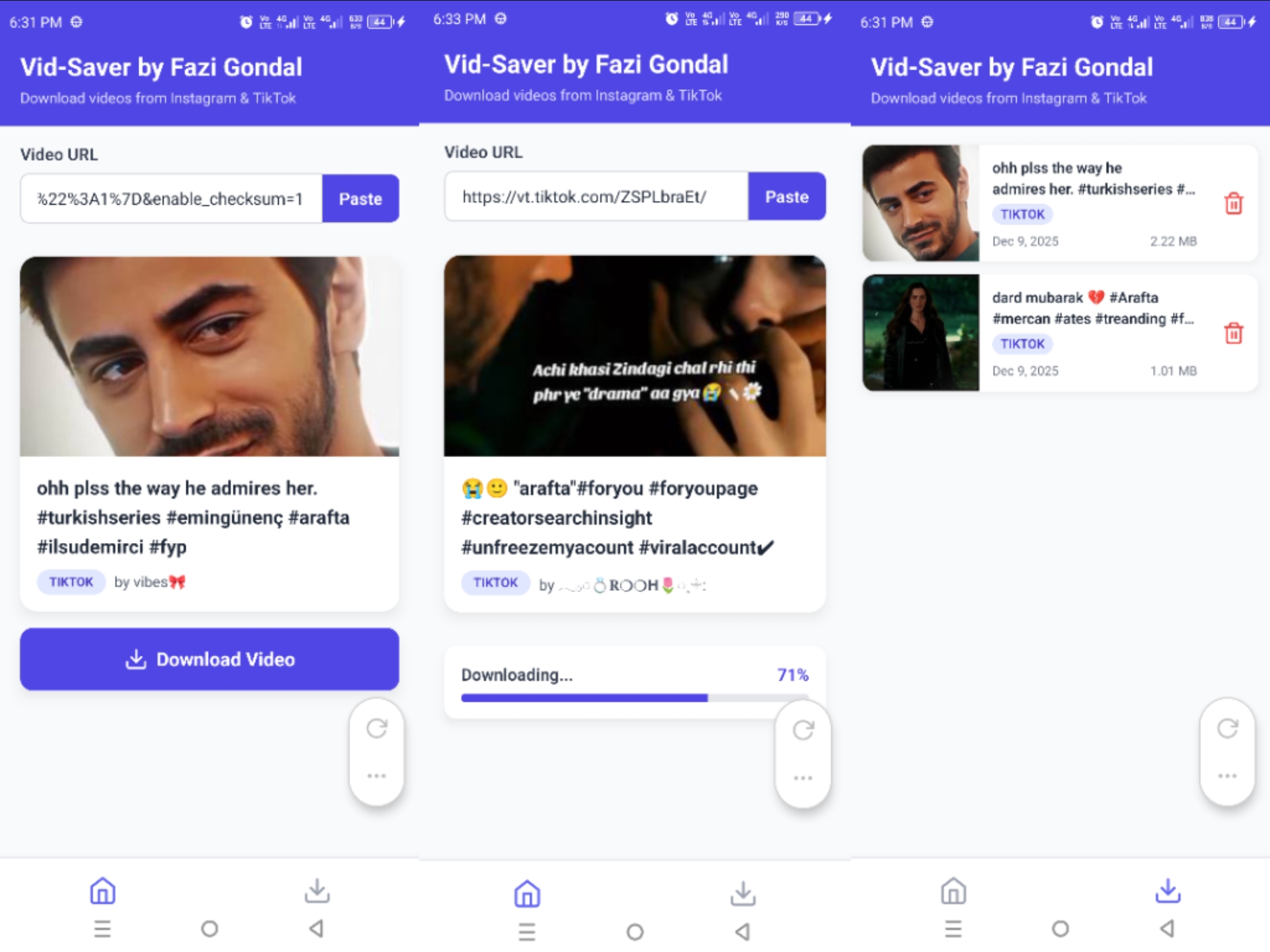
🎯 Features
- 📥 Auto-Download: Automatically downloads videos after fetching metadata
- 📋 Auto-Paste: Detects video URLs from clipboard on app open
- 📂 Smart Storage: Auto-creates
Downloads/VidSaverfolder for organized, duplicate-free saving - 🛡️ Safety Check: Confirmation dialog before deleting any video
- 🔗 Deep Linking: Share videos directly from Instagram/TikTok to the app
- 🎨 Modern UI: Polished "Docked" Tab Bar, Gradient themes, and smooth animations
- 📱 Platform Support: Works for Instagram, TikTok, Facebook, Twitter/X, and more
- ⚡ Progress Tracking: Real-time download progress indicators
📱 Download
Get the latest APK from GitHub Releases
🔑 API Configuration
This app uses a custom high-performance FastAPI Backend to handle metadata fetching and direct download URL generation (bypassing CORS and rate limits).
Backend URL
The app is pre-configured to use the hosted backend:
- URL:
https://fastapi-u8bm.onrender.com
No manual API key configuration is required for the user. The app automatically communicates with this service.
🚀 Getting Started
Prerequisites
- Node.js (v18 or higher)
- npm or yarn
- Expo CLI
- Android Studio (for Android development)
- Xcode (for iOS development, macOS only)
Installation
Clone the repository:
git clone https://github.com/fazi-gondal/vid-saver.git
cd vid-saver
Install dependencies:
npm installStart the development server:
npx expo startRun on your device:
- Press
afor Android - Press
ifor iOS - Scan QR code with Expo Go app
- Press
🛠️ Tech Stack
- Framework: React Native with Expo
- Navigation: Expo Router
- Styling: NativeWind (TailwindCSS for React Native)
- Language: TypeScript
- State Management: React Hooks
- HTTP Client: Axios
- Storage: expo-file-system, expo-media-library
- Clipboard: expo-clipboard
- Deep Linking: expo-linking
📂 Project Structure
vid-saver/
├── app/                    # Expo Router pages
│   ├── (tabs)/            # Tab navigation screens
│   │   ├── index.tsx      # Home screen
│   │   └── downloads.tsx  # Downloads library
│   └── _layout.tsx        # Root layout
├── components/            # Reusable components
├── services/              # API & storage services
├── utils/                 # Utility functions
├── types/                 # TypeScript type definitions
└── assets/               # Images, icons, fonts
🎨 Features Breakdown
Auto-Paste & Auto-Download
- Automatically detects video URLs in clipboard when app opens
- Fetches video metadata automatically
- Starts download immediately after metadata loads
Deep Linking (Share from Apps)
- Share videos directly from Instagram or TikTok
- App opens automatically with shared URL
- Instant download process initiated
Safe Area Support
- Properly handles device notches and safe areas
- Works seamlessly on all modern devices
- Dark status bar for better visibility
🏗️ Building the App
Vid-Saver supports multiple build methods to suit your workflow.
Default: EAS Build (Recommended)
Expo Application Services (EAS) is the default and recommended way to build production APKs.
Quick Start:
# Install EAS CLI
npm install -g eas-cli

# Login to Expo
eas login

# Build production APK
eas build --profile production --platform android
Build Profiles:
preview-apk: Fast builds for testingproduction: Optimized APK with ProGuard (25-35 MB)production-aab: App Bundle for Google Play Store (15-20 MB download)
📖 See BUILD_COMMANDS.md for detailed EAS build commands and options.
Alternative: Codemagic CI/CD
For automated builds and CI/CD pipelines, use Codemagic:
Setup:
- Sign up at codemagic.io
- Connect your repository
- Run workflow: "Vid-Saver Production APK"
Features:
- ✅ Free tier available (500 build minutes/month)
- ✅ Automated builds on push
- ✅ Email notifications with APK download link
- ✅ No local environment setup needed
📖 See CODEMAGIC_SETUP.md for complete setup guide.
Local Build (Advanced)
For developers who prefer complete control:
Requirements:
- Android Studio installed
- Android SDK configured
- JDK 17+
Steps:
# Generate native Android project
npx expo prebuild --clean --platform android

# Navigate to android folder
cd android

# Build release APK
./gradlew assembleRelease
Output: android/app/build/outputs/apk/release/app-release.apk
⚠️ Note: Local builds require manual signing for distribution.
📦 APK Optimization
Good news! EAS Build now automatically includes optimizations in production builds. No extra configuration in eas.json is required.
Production builds automatically include:
- ✅ ProGuard/R8 - Code minification and obfuscation (~20-30% size reduction)
- ✅ Resource Shrinking - Automatic removal of unused resources (~10-15% size reduction)
- ✅ Hermes Engine - Faster startup and smaller JavaScript bundle size
Expected Sizes:
- Production APK: ~25-35 MB (already optimized!)
- Production AAB: ~15-20 MB user download
📖 See APK_OPTIMIZATION.md for more advanced techniques like image optimization and architecture splits.
📚 Documentation
This project includes comprehensive documentation:
- prompt.md - Complete prompt to recreate this app from scratch
- All API endpoints and keys
- Tech stack with versions
- Design specifications
- Implementation details
- BUILD_COMMANDS.md - Build command reference
- EAS build profiles
- AAB vs APK builds
- First-time setup guide
- APK_OPTIMIZATION.md - Size optimization guide
- ProGuard configuration
- Resource shrinking
- Image optimization
- CODEMAGIC_SETUP.md - CI/CD setup guide
- Quick 3-step setup
- Automated builds
- Email notifications
📝 License
This project is licensed under the MIT License - see the LICENSE file for details.
👨💻 Author
Fazi Gondal
- GitHub: @fazi-gondal
🤝 Contributing
Contributions are welcome! Please feel free to submit a Pull Request.
- Fork the project
- Create your feature branch (
git checkout -b feature/AmazingFeature) - Commit your changes (
git commit -m 'Add some AmazingFeature') - Push to the branch (
git push origin feature/AmazingFeature) - Open a Pull Request
⚠️ Disclaimer
This app is for educational purposes only. Please respect copyright laws and only download videos you have permission to download. The author is not responsible for any misuse of this application.
📱 Screenshots
Screenshots coming soon
🐛 Known Issues
- iOS deep linking has limitations compared to Android
- Some Instagram stories may not be downloadable due to API limitations
🔮 Future Enhancements
- [ ] Support for Facebook videos
- [ ] Support for YouTube videos
- [ ] Video quality selection before download
- [ ] Batch download support
- [ ] Download history with search
- [ ] Share downloaded videos directly from app
💬 Support
If you encounter any issues or have questions:
- Open an issue on GitHub Issues
- Check existing issues for solutions