umoeditor
A modern document editor built with Vue.js and UMO Editor - featuring rich text editing, auto-save, fullscreen mode, file management, and Markdown support for a professional writing experience.
README
Open on GitHub ↗UMOEditor
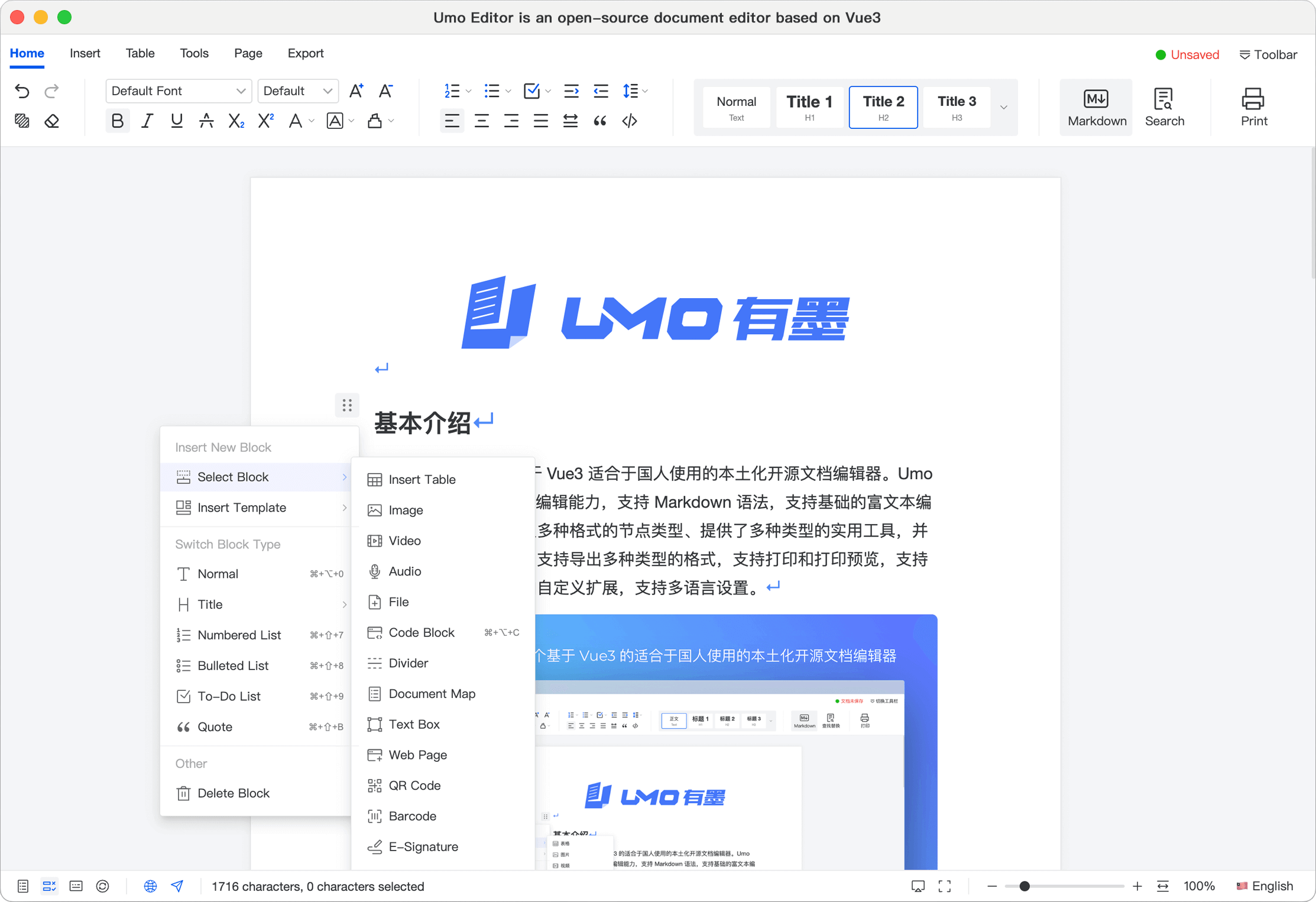
A modern, feature-rich document editor built with Vue.js and the UMO Editor library. This application provides a professional writing experience with a comprehensive set of editing tools, document management, and auto-save functionality.
🚀 Features
- Rich Text Editing - Full-featured WYSIWYG editor with support for text formatting, tables, and media
- Fullscreen Mode - Distraction-free writing experience with automatic fullscreen on launch
- Auto-Save - Automatic document saving every 30 seconds to prevent data loss
- File Management - Upload and manage images and files directly in the editor
- Markdown Support - Write in Markdown and see real-time rendering
- Spell Checking - Built-in spell checker for error-free content
- Multiple Layouts - Support for page and web layouts with customizable margins
- Toolbar Modes - Ribbon-style toolbar with organized menus (Base, Insert, Table, Tools, Page, Export)
- Responsive Design - Works seamlessly across different screen sizes
- Document Export - Export documents in various formats
- Customizable - Configurable editor settings and theme options
🛠️ Tech Stack
Frontend Framework
- Vue.js 3.5.22 - Progressive JavaScript framework with Composition API
- Vite 7.1.7 - Next-generation frontend build tool
Core Libraries
- @umoteam/editor 8.1.0 - Professional document editor component
- Axios 1.12.2 - Promise-based HTTP client for API requests
Build Tools
- @vitejs/plugin-vue 6.0.1 - Official Vue plugin for Vite
📁 Project Structure
umoeditor/
├── public/
│   └── favicon.png          # Application icon
├── src/
│   ├── assets/              # Static assets
│   ├── components/
│   │   └── Editor/
│   │       └── UmoEditorWrapper.vue  # UMO Editor wrapper component
│   ├── composables/         # Vue composables for shared logic
│   │   ├── useEditor.js
│   │   └── useFileUpload.js
│   ├── config/
│   │   └── editorConfig.js  # Editor configuration settings
│   ├── services/            # API and business logic services
│   │   ├── documentService.js
│   │   └── fileService.js
│   ├── utils/               # Utility functions
│   ├── views/
│   │   └── EditorView.vue   # Main editor view
│   ├── App.vue              # Root component
│   ├── main.js              # Application entry point
│   └── style.css            # Global styles
├── index.html               # HTML template
├── package.json             # Project dependencies
└── vite.config.js           # Vite configuration
🚀 Getting Started
Prerequisites
- Node.js (v16 or higher recommended)
- npm or yarn package manager
Installation
- Clone the repository:
git clone <repository-url>
cd umoeditor
- Install dependencies:
npm install
Development
Start the development server:
npm run dev
The application will be available at http://localhost:5173 (or another port if 5173 is in use).
Build
Create a production build:
npm run build
The optimized files will be generated in the dist directory.
Preview
Preview the production build locally:
npm run preview
⚙️ Configuration
Editor Settings
The editor can be configured through src/config/editorConfig.js. Key configuration options include:
- Locale & Theme - Language (en-US) and theme (light/dark)
- Toolbar - Customize toolbar menus and modes
- Page Settings - Margins, orientation, background, and watermarks
- Document - Auto-save interval, spell check, markdown support
- File Upload - Allowed file types and maximum file size (100MB)
Environment Variables
You can customize the CDN URL and other settings in the editor configuration file.
💡 Usage
- Start Writing - The editor opens in fullscreen mode with autofocus enabled
- Format Text - Use the ribbon toolbar to format text, insert elements, and manage tables
- Insert Media - Upload images and files up to 100MB
- Auto-Save - Documents are automatically saved every 30 seconds
- Export - Use the export menu to save your document in various formats
🎨 Customization
Default Font
The editor uses Segoe UI as the default font for optimal readability.
Page Margins
Default margins are set to:
- Left/Right: 3.18 cm
- Top/Bottom: 2.54 cm
🤝 Contributing
Contributions are welcome! Feel free to:
- 🐛 Report bugs
- 💡 Suggest new features
- 🔧 Submit pull requests
👨💻 Author
Faizan Gondal
- GitHub: @fazi-gondal
- Project: Umoeditor
📄 License
This project is licensed under the MIT License - feel free to use it for personal or commercial projects.
Made with ❤️ by Faizan Gondal
⭐ If you find this project useful, please consider giving it a star on GitHub! ⭐