← BACK
Business-card-generator
A modern, feature-rich business card generator built with HTML, CSS, and JavaScript.
README
Open on GitHub ↗CardCraft Pro - Business Card Generator
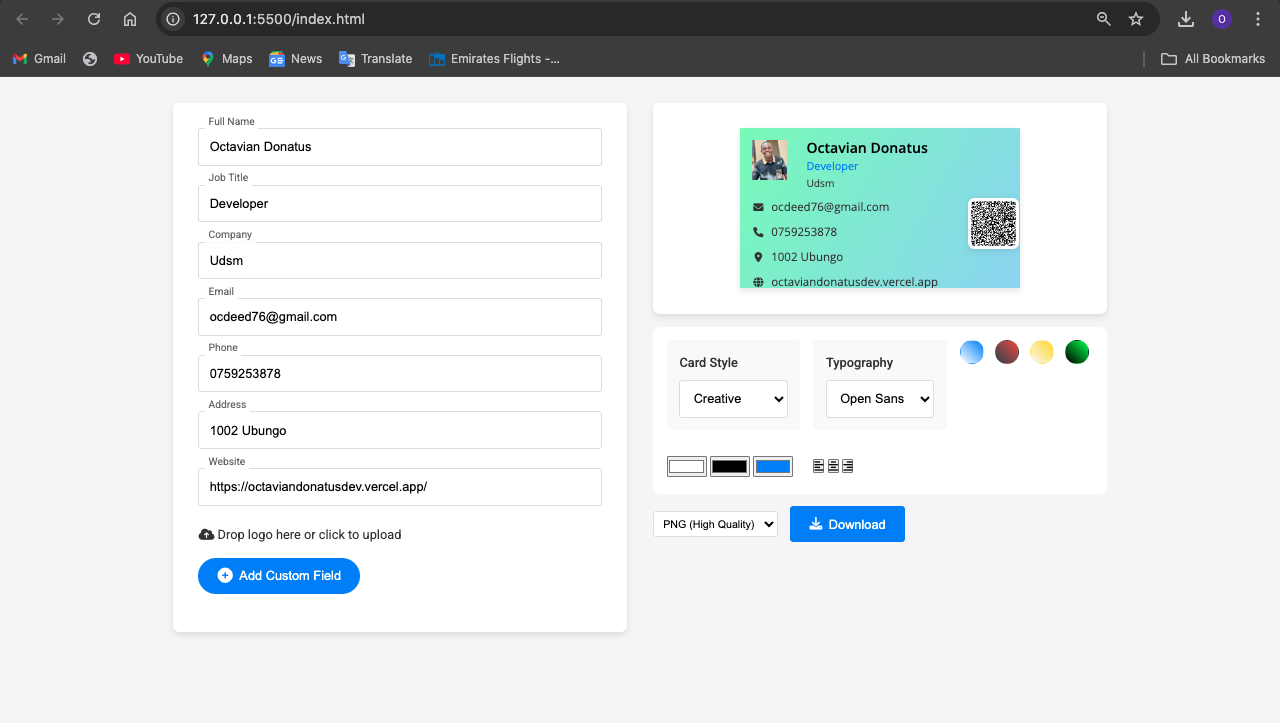
A modern, feature-rich business card generator built with HTML, CSS, and JavaScript.
🌟 Features
Interactive Design Interface
- Real-time preview
- Multiple templates
- Custom color schemes
- Font selection
- Logo upload & positioning
Smart Contact Integration
- Automatic QR code generation
- vCard format support
- Social media links
Customization Options
- 8 professional templates
- Custom color picker
- Font combinations
- Logo placement options
- Custom fields support
Export Options
- High-quality PNG export
- Compressed JPG option
- Print-ready resolution
🚀 Getting Started
Clone the repository
git clone https://github.com/ocdeed/Business-card-generator.gitOpen the project
- Navigate to the project directory
- Open
index.htmlin a modern web browser
Start creating
- Fill in your details
- Choose a template
- Customize colors and fonts
- Download your business card
💻 Technologies Used
- HTML5
- CSS3 (with CSS Grid and Flexbox)
- Vanilla JavaScript
- Libraries:
- html2canvas
- QRCode.js
- Font Awesome
🎨 Templates
- Minimalist
- Corporate
- Creative
- Bold
- Elegant
- Modern
- Neon
- Geometric
🛠 Browser Support
- Chrome (recommended)
- Firefox
- Safari
- Edge
📱 Responsive Design
- Desktop optimized
- Tablet friendly
- Mobile responsive layout
🤝 Contributing
- Fork the repository
- Create your feature branch (
git checkout -b feature/AmazingFeature) - Commit your changes (
git commit -m 'Add some AmazingFeature') - Push to the branch (
git push origin feature/AmazingFeature) - Open a Pull Request
✨ Credits
Created with ❤️ by Ocdeed Codes
📧 Contact
For support or inquiries, please open an issue or contact:
- Email: [email protected]
- Twitter: @Rwehumbiza23
Made with 🚀 by Ocdeed Codes | Website